Network home & discovery
Live Now, Trending, Recently Added, categories, new creators and channel discovery give viewers a familiar way to find content.
OA Channel Cast brings the familiar experience of a modern creator platform into an infrastructure you control — with creator profiles, channels, live broadcasting, uploads, reels, stories, schedules, community tools and deep per-channel moderation.
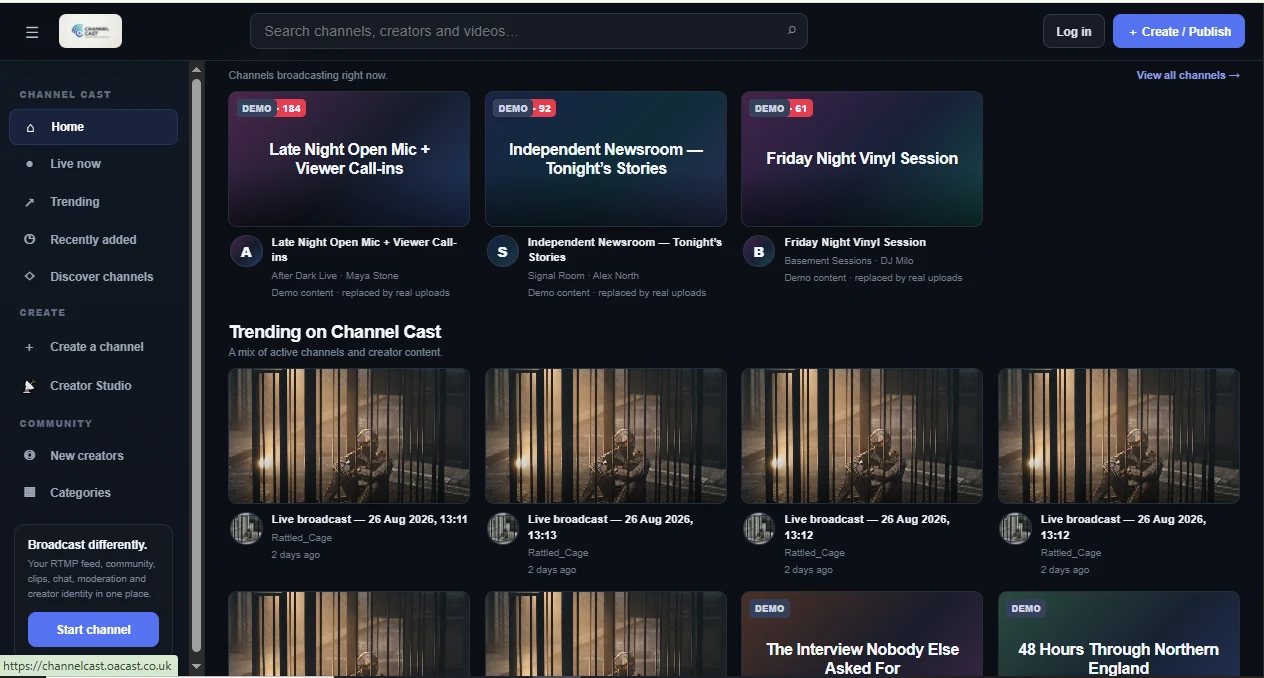
Channel Cast combines network discovery, creator identity, live channels, published media and community interaction instead of splitting them across separate systems.
Live Now, Trending, Recently Added, categories, new creators and channel discovery give viewers a familiar way to find content.
Creators have a public identity across the network and can operate separate channels with independent branding, content, schedules and stream credentials.
One channel can host live broadcasts, long-form uploads, short-form reels, stories, posts and upcoming schedule information.
Each channel gets a branded public destination with live/offline state, archive access, reels, schedule, creator details and interaction controls.
OA Channel Cast is designed for creators, independent networks, events, community broadcasters and organisations that want their own branded media destination.
Private RTMP credentials for each channel, OBS-friendly publishing and HLS playback for viewers.
A network homepage designed around finding active channels, fresh creators and recently added content.
Publish archive and on-demand video inside each creator channel instead of relying only on live broadcasts.
Give creators faster ways to publish short updates, vertical media and community posts around their main channel.
Avatar, cover, biography, location, website and social links create a reusable public identity across the network.
Publish upcoming programming so viewers can see what is planned before the next live show begins.
Channel-specific viewer nicknames, public chat and reactions with server-side identity protection.
Private member messages, direct channel messages, voice notes and a private Channel Inbox for viewer questions and tips.
Blocked phrases, link controls, repeat detection, held messages and scoped viewer restrictions are built into channel operations.
Viewers can flag moments while producers add timeline markers and review audience clip heat after important sections.
Lower thirds, breaking banners, ticker, countdown, slate, studio queue and items sent on air from one producer workspace.
Open or close creator registration, review channels and live state, identify owners, suspend tenants and reactivate them centrally.
The community layer is designed to help channel teams interact with viewers while still having strong moderation and emergency controls when a live audience gets busy.
Viewers can choose a nickname per channel without becoming creators. Protected names cannot normally be claimed by another viewer identity inside that channel.
Moderators can hold suspicious messages, restrict specific interaction types and shadow-restrict a viewer server-side without turning moderation into a public confrontation.
One action can temporarily tighten multiple interaction surfaces when a channel is being flooded or targeted.
Producer tooling sits alongside the public channel instead of requiring a separate moderation, graphics and show-control stack.
Lower thirds, breaking banners, ticker, countdown and slate controls for live presentation.
Call-In Waiting Room, audience clip heat, producer timeline markers and pending voice activity.
Move approved chat, voice or interaction items into an on-air queue with history and producer control.
Queue, review, approve and mark viewer call-in requests on-air. The current release manages the producer workflow rather than transporting guest microphone/camera media into OBS.
The public network focuses on discovery, while each creator channel becomes its own branded destination with playback, content, schedule and community interaction.

Each creator channel has separate state, media, community controls and streaming credentials. Creator identity is kept separate from channel identity and viewer chat identity.
Public identity and account.
Brand, content and community.
Private RTMP credentials.
Channel-specific stream path.
Browser-friendly viewing.
Chat, moderation and producer tools.
Manage profile identity, channels and private streaming credentials before opening each channel's deeper admin workspace.
Operate branding, content, schedule, moderation, community features, relays and Live Studio independently for every channel.
Channel Cast can be positioned as a branded creator community, an independent video network, an event platform, a membership video hub or a multi-channel live broadcasting service.
Run multiple creators and channels under one branded destination.
Combine live production, community interaction and archived media.
Give creators profiles, channels, uploads, reels and real community tools.
Use channel controls and moderation as a foundation for a focused media network.
We can deploy, brand and extend Channel Cast around your channels, creators, live workflows and infrastructure requirements.