
Connect the stream
Point Vault 42 at the station's direct HTTP or HTTPS listen stream. No change to the listener-facing player is required.
OA Vault 42 — the Radio Vault 42 broadcast archive — pulls your station's existing direct HTTP/HTTPS listen stream, records it continuously with FFmpeg, converts the feed into clock-aligned hourly MP3 files and stores them inside a secure rolling archive.

Vault 42 sits beside the station rather than replacing its streaming provider. Give the recorder a stable direct stream URL and the platform handles capture, segmentation, storage, access and rolling retention.
Point Vault 42 at the station's direct HTTP or HTTPS listen stream. No change to the listener-facing player is required.
FFmpeg supervises and records the station feed around the clock, with operational health visibility for administrators.
The recording is organised into clear hourly blocks such as 00:00–01:00, 01:00–02:00 and onward through the day.
Each completed segment becomes a simple archive file that authorised users can play in-browser or download.
The archive retains the configured 42-day window and removes expired segments as newer recordings enter the vault.
The recording interface is intentionally operational rather than complicated: choose a station channel and date, then work through the available hourly segments.
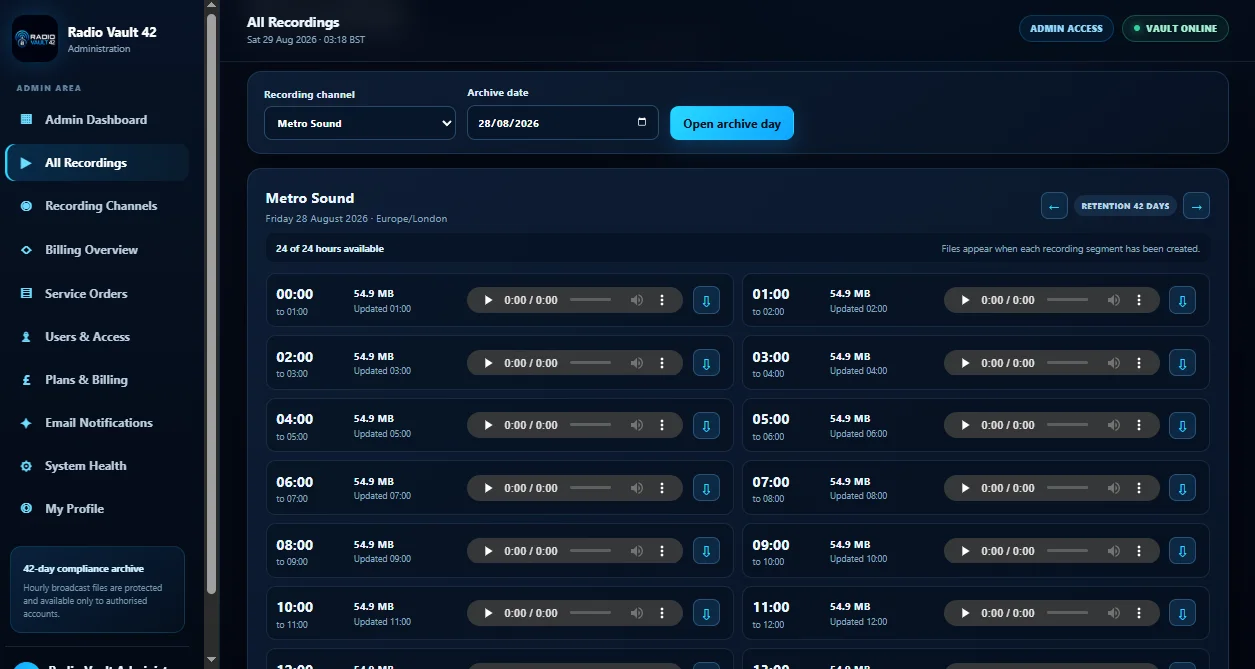
Open the exact archive day for a recording channel and move backwards or forwards through retained dates.
Each day is presented as clear clock-aligned one-hour recording windows with file status and update time.
Authorised users can listen to an archive segment directly in the dashboard and download only when they need a local copy.
The service is built for a defined broadcast-retention period rather than uncontrolled permanent file accumulation.
The supplied Vault interface covers the full operational lifecycle: recording channels, authorised users, billing/service visibility, notifications and system health around the core archive.
Designed to keep the recorder operating continuously while surfacing health and service state to administrators.
Jump straight to a retained date, inspect available hours and move through the archive without digging through raw folders.
Listen to individual hourly recordings in the browser before deciding whether the file needs to be exported.
Download the exact hour required rather than transferring an entire day or retention window.
Administrators control recording channels and user access; channel users see only archives assigned to their account.
Operational messaging can be used for service events, account notices and archive-related notifications.
Keep recorder health separate from the archive itself so operators can detect a source or recording problem quickly.
Administration areas can bring service orders, plans, billing and account profile controls into the same management experience.
The core job is intentionally narrow: ingest an existing stream reliably, create clean hourly MP3 segments and make the retained recordings easy to retrieve.
OA Vault 42 does not need to become your radio streaming panel. It can consume the direct listen feed from an existing station, which makes it suitable as a dedicated retention layer behind OA Cast Radio or another compatible stream source.
It is purpose-built around radio broadcast recording and timed retention. OA Storage Box remains the general-purpose product for backups, snapshots and wider file storage.
Use when you need continuous station capture and an easy-to-navigate rolling archive of what was actually transmitted.
Use for server backups, media copies, snapshots, larger archives and files that are not generated from a continuous broadcast recorder.
Connect the existing radio stream and give your team a clean daily archive instead of manually recording, naming and clearing files.